For Developers
MapConductor is designed to be friendly to developers building map apps on Android and iOS. Instead of learning a new API for each vendor, you learn one set of concepts and reuse them across providers and platforms.
Current Status
Section titled “Current Status”Android
Section titled “Android”- Supported map SDKs: Google Maps, Mapbox, ArcGIS Maps SDK, HERE SDK, MapLibre
- UI framework: Jetpack Compose
- Features available through the unified API:
- Displaying maps
- Markers (fully customizable)
- InfoBubble (written in Jetpack Compose)
- Polylines and polygons
- Circles with meter-based radius
- Ground images
- Heatmaps
- Marker clustering
- Raster layers
- Supported map SDKs: Google Maps, Mapbox, MapKit, ArcGIS Maps SDK, MapLibre
- UI framework: SwiftUI
- Features available through the unified API:
- Displaying maps
- Markers (fully customizable)
- InfoBubble (written in SwiftUI)
- Polylines and polygons
- Circles with meter-based radius
- Ground images
- Heatmaps
- Marker clustering
- Raster layers
Android Usage Example
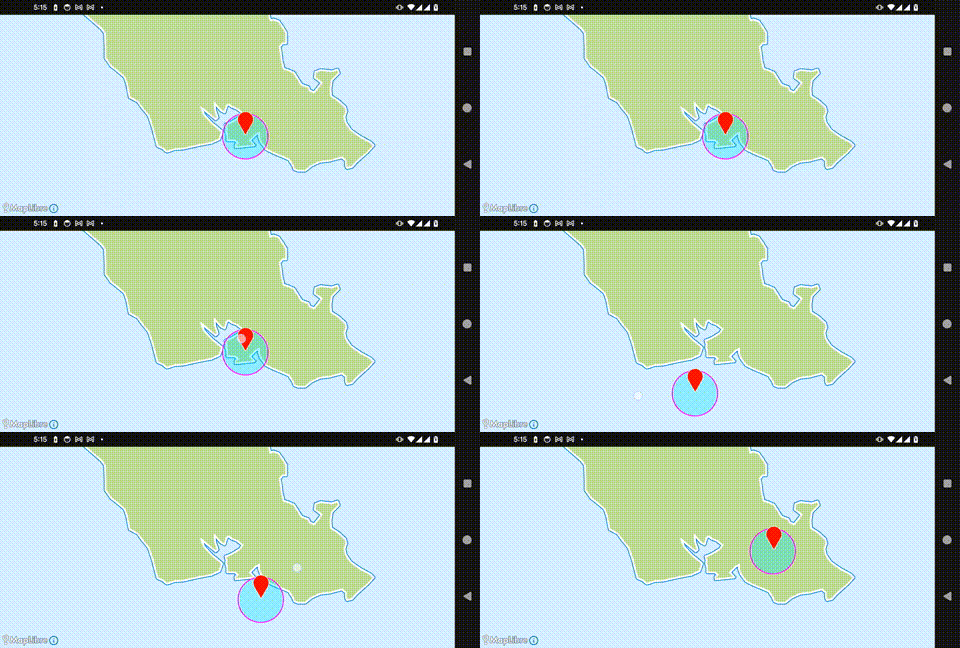
Section titled “Android Usage Example”The following is a simple sample code for MapConductor on Android. For actual API details and installation instructions, please refer to the separate MapConductor Android SDK documentation site.
// State for the map SDK you want to use// Google Maps → rememberGoogleMapViewState// Mapbox → rememberMapboxViewStateval state =    rememberMapLibreMapViewState(        cameraPosition =            MapCameraPositionImpl(                position = GeoPointImpl.fromLatLong(21.324513, -157.925074),                zoom = 5.0,            ),    )// Markerval markerState =    remember {        MarkerState(            position = GeoPointImpl.fromLatLong(21.324513, -157.925074),            draggable = true,        )    }
// Circleval circleState =    remember {        CircleState(            id = "demo-circle",            center = markerState.position,            radiusMeters = 5000.0,            strokeColor = Color.Magenta,            strokeWidth = 2.dp,            fillColor = Color.Cyan.copy(alpha = 0.3f),            geodesic = true,        )    }
// Display the map// Google Maps → GoogleMapView// Mapbox → MapboxMapViewMapLibreMapView(    modifier = modifier,    state = state,    onMarkerDrag = { draggedState ->        // When the marker is dragged, move the circle center        circleState.center = draggedState.position    },) {    Marker(markerState)    Circle(circleState)}
iOS Usage Example
Section titled “iOS Usage Example”The following is a simple sample code for MapConductor on iOS. For actual API details and installation instructions, please refer to the separate MapConductor iOS SDK documentation site.
import SwiftUIimport MapConductorCoreimport MapConductorForMapLibre
struct ContentView: View {    @StateObject private var state = MapLibreViewState(        cameraPosition: MapCameraPosition(            position: GeoPoint(latitude: 21.324513, longitude: -157.925074),            zoom: 5        )    )
    @State private var markerPosition = GeoPoint(latitude: 21.324513, longitude: -157.925074)
    var body: some View {        // Google Maps → GoogleMapView        // Mapbox → MapboxMapView        // MapKit → MapKitMapView        MapLibreMapView(state: state) {            Marker(                position: markerPosition,                icon: DefaultMarkerIcon(label: "T"),                draggable: true,                onDragEnd: { position in                    markerPosition = position                }            )            Circle(                center: markerPosition,                radiusMeters: 5000,                fillColor: UIColor.cyan.withAlphaComponent(0.3),                strokeColor: UIColor.magenta,                strokeWidth: 2            )        }    }}